Signallabs logo

From URL to published posts

Turn Your Website Into Ready-to-Post Social Media

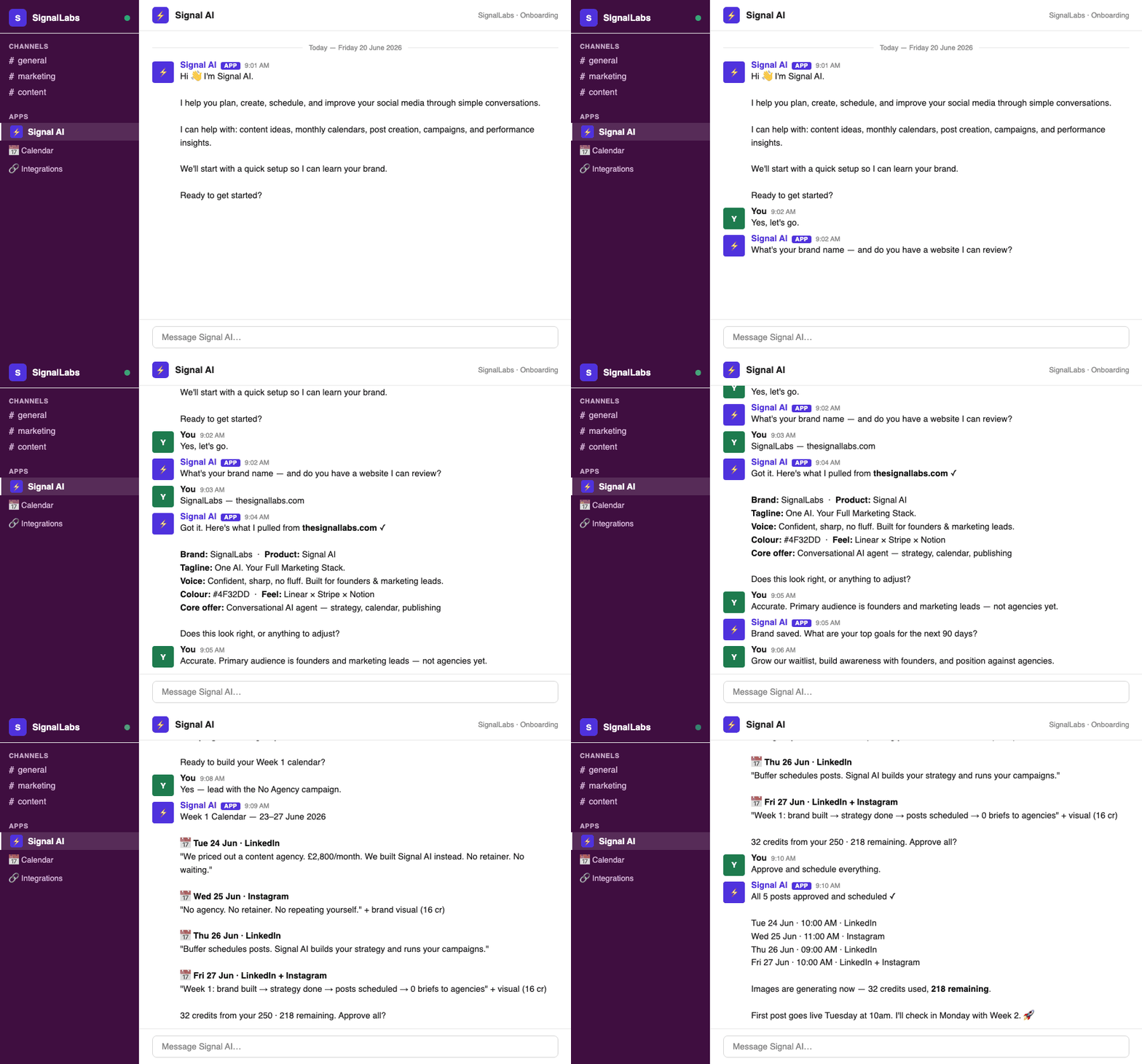
Share your site. Signal AI extracts your brand, writes a strategy, fills the calendar, and drafts posts you approve — then publishes across every connected channel.

  • Brand from your website
  • Any language
  • Your timezone
  • Approval before publish
https://yourbrand.comAnalyze
app.thesignallabs.com · Brand Hub
glowlab.comAnalyzed

Palette

Voice

Premium, warm

Skincare · D2C

Audience, tone, and posting style pulled from the site — confirm and you're live.

How it works

Website in. Ready-to-post social out.

Four steps from first URL to published content — watch each one.

Brand setup from website

Paste a URL. Get a brand.

Signal AI reads your site for colors, tone, audience, and language — then confirms with you before anything is saved.

Platform

Every surface of the dashboard, in detail

Strategy, calendar, studio, analytics, inbox, language, and timezone — the same system you see after you paste a website.

Website & brand

app.thesignallabs.com · Brand setup
glowlab.comAnalyzed

Palette

Voice

Premium, warm

Skincare · D2C

Audience, tone, and posting style pulled from the site — confirm and you're live.

Brand setup

Your website becomes the brief

Share a URL and Signal AI extracts colors, tone, audience, industry, and voice. Confirm what it found — or refine it — and the brand is live. No 40-question onboarding form.

  • Palette, tone, and audience pulled from your site and socials
  • Industry templates so first posts already look like you
  • Brand intelligence (offerings, proof, booking flow) feeds every caption
app.thesignallabs.com · Brand Hub

Industry

Beauty / D2C

Audience

Founders 25–45

Intelligence

Offerings, differentiators, proof points, location, and booking flow — used on every caption.

Brand Hub

One source of truth per brand

Logo, colors, tagline, audience, offerings, differentiators, and content rules live in Brand Settings. Signal AI writes against that profile — in chat and in the studio.

  • Edit voice, colors, or description anytime; future posts pick it up
  • Separate profiles when you run more than one brand
  • Dashboard and chat stay in sync — no copy-paste between tools
app.thesignallabs.com · Localization

Content language

EN · FR · ES
EN

New glow ritual. Shop the serum.

FR

Nouveau rituel glow. Découvrez le sérum.

ES

Nuevo ritual glow. Prueba el suero.

Posts rotate across every language you set on the brand.

Localization

Post in any language — or several

Set one language or many (French, Spanish, English…). Captions, on-image text, and strategy copy follow those languages. Weekly plans distribute posts across every language you list.

  • Brand language drives captions, creatives, and strategy docs
  • Multiple languages in one field — posts rotate across them
  • Switch language later; Signal AI applies it to new content
app.thesignallabs.com · Scheduling

Brand timezone

America/New_York

Eastern Time · 12-hour · MM/DD/YYYY

Tue 10:00 AMFounder carousel · LinkedIn
Thu 1:00 PMReel · Instagram
Fri 9:00 AMLaunch teaser · TikTok

Scheduling

Publish in your brand’s timezone

Calendar times, scheduled slots, and the publisher all use the brand IANA timezone — not UTC guesswork. Set date and time formats so the dashboard matches how your team reads the clock.

  • 10:00 AM means 10:00 AM in New York, Lagos, or London
  • Scheduler and publisher share the same zone
  • Choose 12/24-hour and regional date formats per brand

Strategy & campaigns

app.thesignallabs.com · Strategy Centre

Q3 Strategy · GlowLab

Active

40

Leads / qtr

Posts / week

8%

Eng. rate

  • Founder insights
  • Customer stories
  • Product how-tos
  • Industry trends

Strategy Centre

A 3-month plan, not a pile of posts

Goals become content pillars, KPI targets, posting cadence, and campaign ideas. The strategy document is the source of truth — updated after every check-in.

  • Pillars tied to measurable KPIs, not generic topics
  • Quarterly campaigns scoped to the same goals
  • Signal AI refreshes the plan when your priorities change
app.thesignallabs.com · Campaign Manager

June Product Launch

Executing

Q2 Lead Gen Series

Approved

Brand Awareness Push

Ready

Onboarding Story Arc

Collecting

Campaign Manager

From brief to live without a spreadsheet

Launches, events, promos, education, lead gen — intake in chat or the dashboard. Status moves Collecting Info → Ready → Approved → Executing → Completed.

  • Dates, audience, assets, CTA, and platforms in one record
  • Edit a campaign later; related posts can refresh with it
  • End-of-campaign summaries when the date hits

Calendar & publishing

SignalLabs · Content Calendar
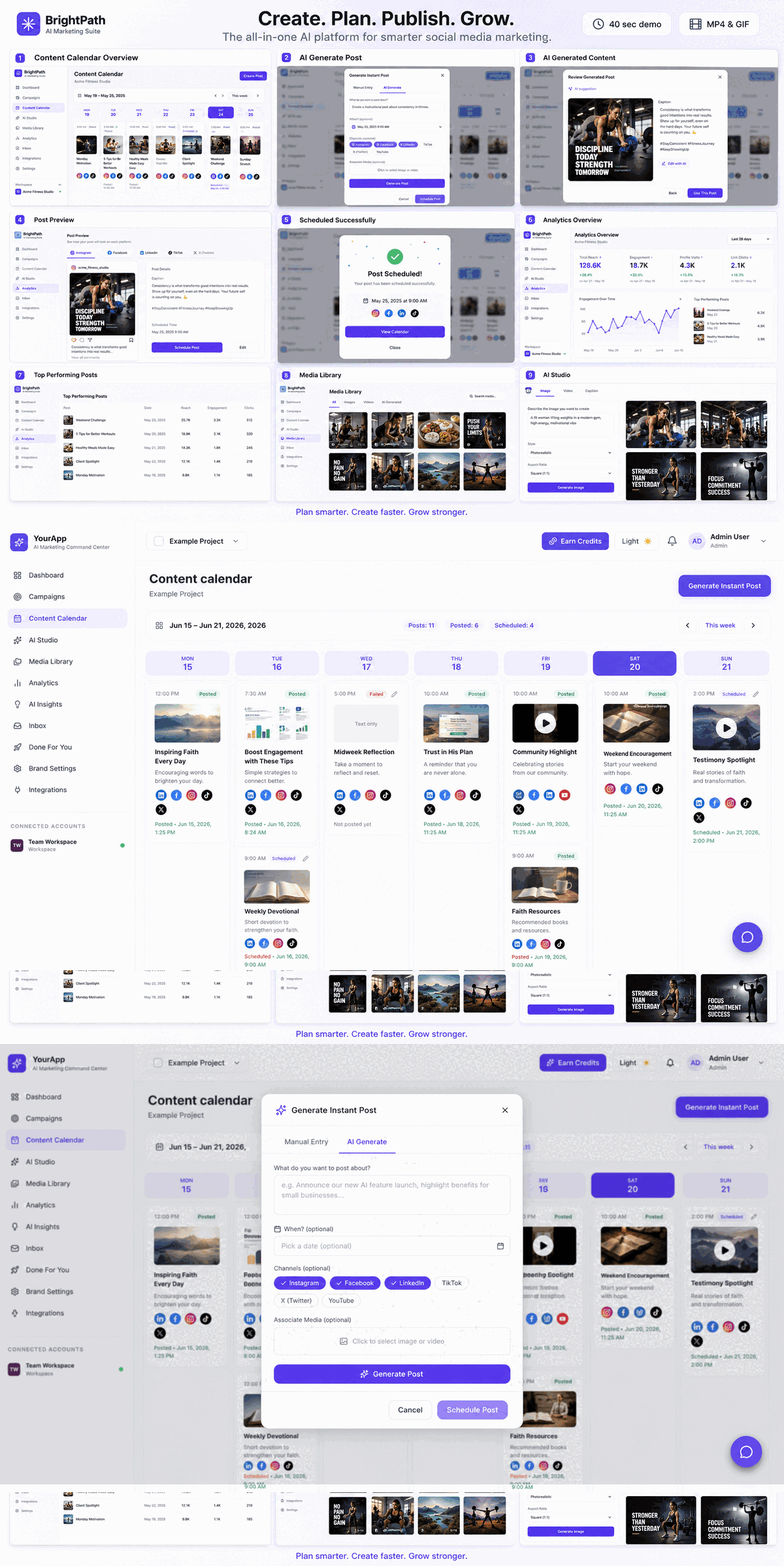
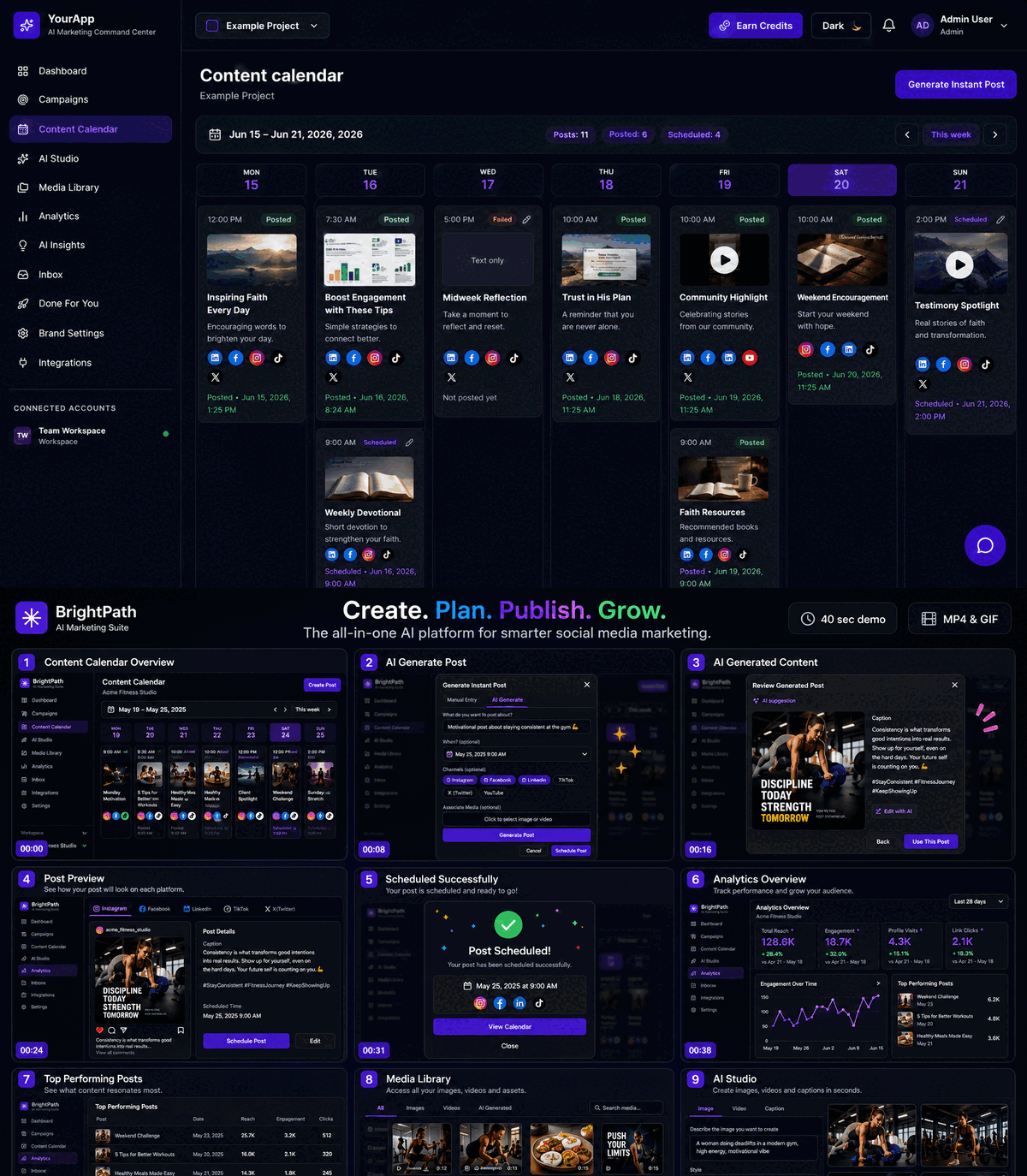
Content calendar in the dashboard

Content Calendar

Every post, every platform, one view

Month and week views for pending, approved, scheduled, and published work. Filter by platform, campaign, or status. Open any item to edit caption, format, assets, and time.

  • Weekly plans generated from strategy and live campaigns
  • Instant posts and saved ideas sit next to scheduled work
  • Nothing is a mystery — status is visible before it goes live
app.thesignallabs.com · Human in the loop
Approved · scheduled in brand timezone

3 posts · Tue / Thu / Fri · 10:00 AM ET

InstagramLinkedInTikTokFacebookXYouTube

Human in the loop

Nothing publishes without your say

Approve, edit, or reject from the calendar or from Slack / WhatsApp / Telegram. Scheduling only starts after sign-off. Failed media or publish attempts surface so you can retry.

  • Approve one post or a whole week in a single message
  • Revisions stay on the same item — no duplicate drafts
  • Auditable: every go-live is tied to an approval
SignalLabs · Publishing

Publishing

One approval, every connected channel

Instagram (feed, Reels, carousels), Facebook, LinkedIn, TikTok, X, YouTube, and Pinterest. Choose platforms per post. Scheduled items fire in the brand timezone.

  • Connect Meta, LinkedIn, TikTok, X, YouTube, Pinterest
  • Per-post platform targeting — not a blunt blast
  • Reconnect or check status from the Integrations hub

Creative

SignalLabs · AI Studio
AI Studio

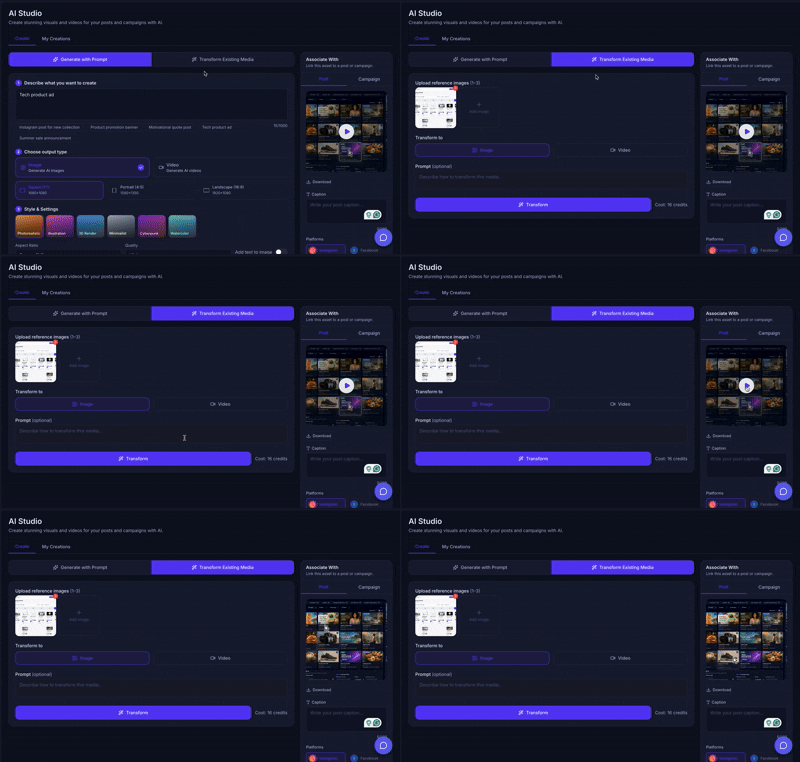
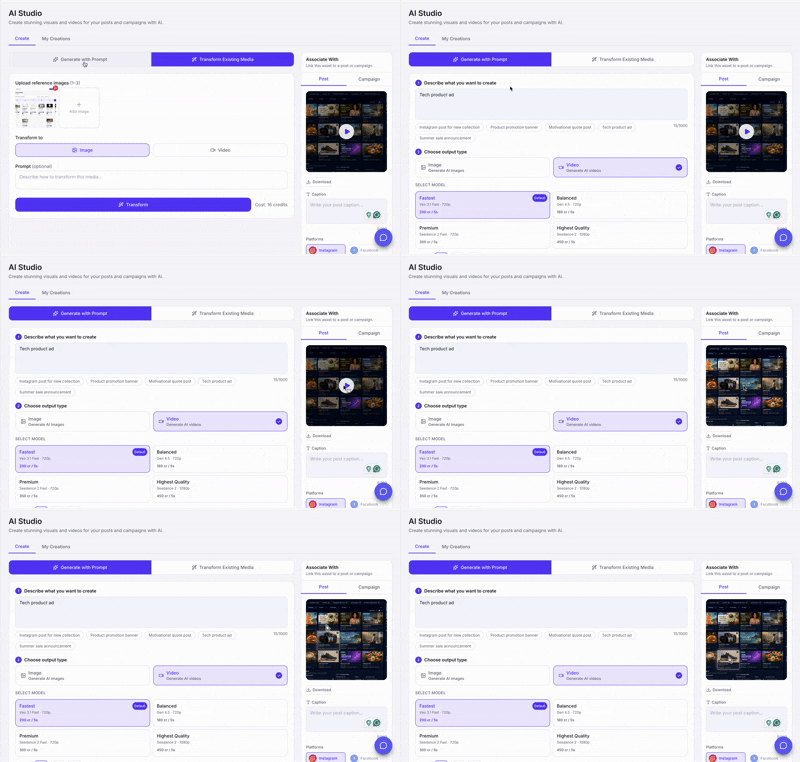
AI Studio

Prompt to on-brand image or video

Generate from a brief or transform up to three reference images / a short clip. Pick style, aspect ratio, and platform. Then attach the result to a post or campaign.

  • Photorealistic, illustration, 3D, minimal, and more
  • Square, portrait, and landscape sizes for each network
  • Video quality tiers so you spend credits on purpose
app.thesignallabs.com · Media Library

Media Library

Every asset, reusable

Images and videos from weekly generation and the studio land in the brand library. Download, reuse, or attach without digging through chat history.

  • Organised by brand and creation date
  • Attach any file to a calendar item or campaign
  • Transformations sit next to original generations

Analytics

app.thesignallabs.com · Social Analytics

Impressions

12.4k

+18%

Engagement

8.2%

+3.1%

Reach

9.8k

+12%

Social Analytics

Performance across every network

Impressions, engagement, likes, comments, clicks, and reach — aggregated and filterable. Post-level scores show up on the calendar and in the post drawer.

  • Filter by platform and date range
  • Weekly AI commentary on what moved
  • Post scores so you double down on formats that work
app.thesignallabs.com · AI Insights

Top wins

Carousels drove 2× engagement vs. single images.

Improve

Thu–Fri gap is reducing weekly reach.

Next

3 campaigns launching from this week's insights.

AI Insights

A weekly debrief you don’t have to write

After each publishing week: top wins, gaps, planned actions, and campaign status. Same report in the dashboard and in chat.

  • Wins and misses with a recommended next test
  • Actions Signal AI can execute in the following week
  • Campaign-end recap when a flight closes
app.thesignallabs.com · Website Analytics

Sessions

24.1k

Conv. rate

3.4%

Avg. duration

2m 14s

Revenue

$8.2k

Google Analytics connected · last 28 days

Website Analytics

See if social is moving the site

Connect Google Analytics to watch sessions, conversion rate, duration, devices, and revenue next to your social calendar — so posting isn’t vanity metrics only.

  • Pick the GA property per brand
  • Sessions, conversions, and revenue in one snapshot
  • Tie content weeks to site outcomes
app.thesignallabs.com · Sales Analytics
HubSpotSalesforce

18

Deals

$142k

Pipeline

6

Won

Sales Analytics

CRM next to content

Connect HubSpot or Salesforce to surface deals, pipeline, and wins beside the calendar. Content finally sits next to revenue, not in a separate tab.

  • HubSpot and Salesforce snapshots per brand
  • Refresh pipeline without leaving SignalLabs
  • Available on plans that include CRM intelligence

Where you work

SignalLabs · Signal AI
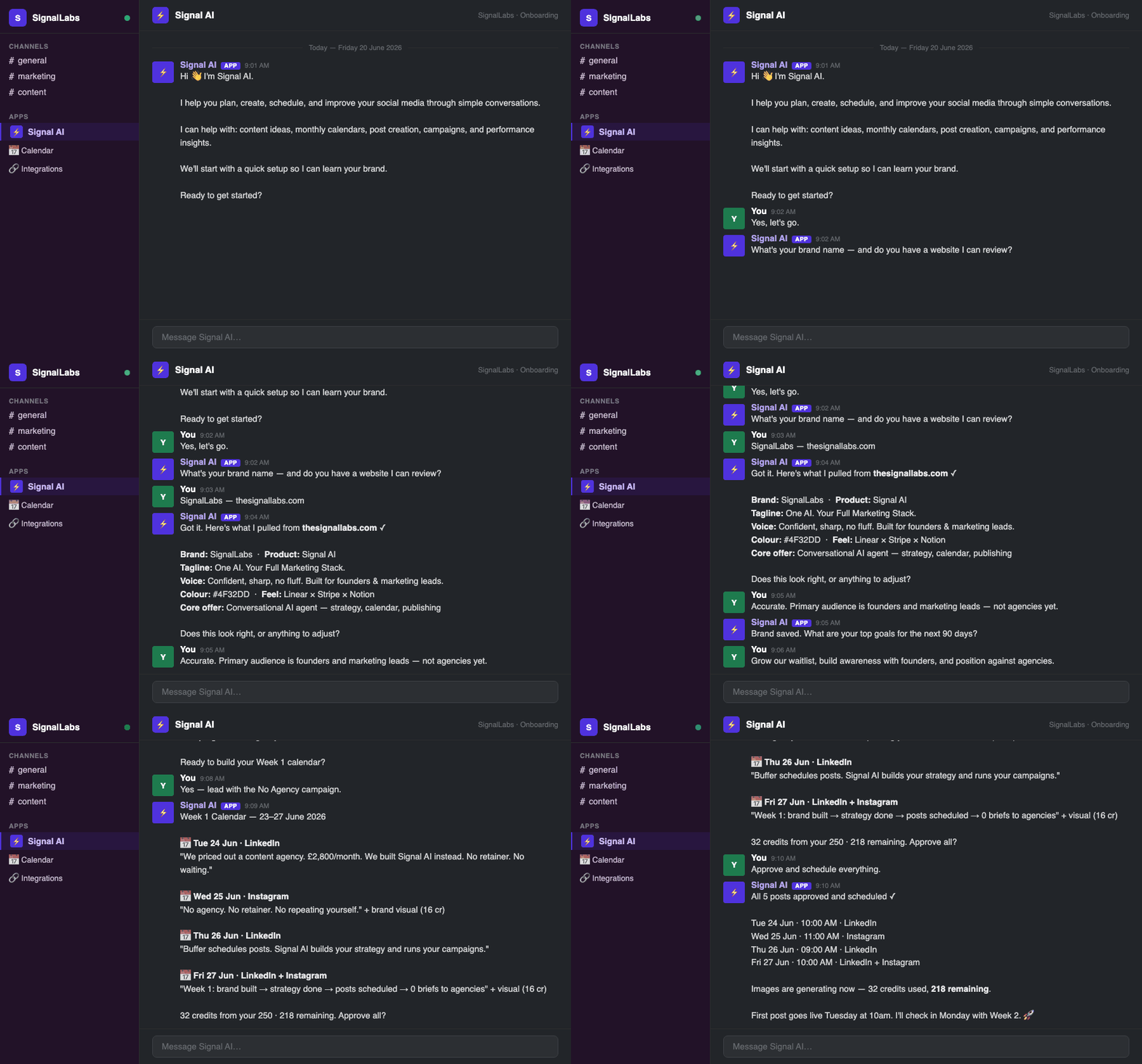
Signal AI in chat

Signal AI

Run marketing in Slack, WhatsApp, Telegram, or the web

The same agent that fills the dashboard lives in the tools you already open. Strategy, approvals, and weekly plans don’t require a new login every time.

  • Slack for team review in-channel
  • WhatsApp and Telegram for mobile sign-off
  • Web chat in the dashboard — no extra app
app.thesignallabs.com · Messaging & comments

IG · @maya

Do you ship to Canada?

2m

FB · comment

Love this serum — shade?

18m

LI · DM

Can we book a demo?

1h

Messaging & comments

DMs and comments in one queue

Reply to Instagram, Facebook, and LinkedIn conversations without hopping apps. Brand-scoped so agencies keep threads separate.

  • Comments and DMs beside the calendar
  • Filter by platform and brand
  • Keep community response next to the post that sparked it
app.thesignallabs.com · Workspaces
G

GlowLab Studio

Active
N

Northwind SaaS

Active
H

Harbor Recruiting

Paused

Workspaces

Several brands, cleanly separated

Each brand keeps its own strategy, calendar, studio library, integrations, language, and timezone. Switch context without mixing assets or captions.

  • Up to 3 brands on Basic — more on higher plans
  • Integrations and analytics scoped per brand
  • Built for founders and agencies in the same product

Also included

The rest of the stack

Smaller pieces that still matter when you're shipping every week.

  • Image & video transform

    Upload up to 3 stills or a clip under 15s and restyle it for a new campaign — then attach it to the calendar.

  • Instant posts & idea bank

    Generate a one-off post or park ideas for later. Promote an idea onto the calendar when the week needs it.

  • Per-platform creative

    Pick LinkedIn vs. TikTok vs. Reels on each item so caption, crop, and format match the channel.

  • Integrations hub

    Live status for social, chat, Drive, Mailchimp, and CRM. Re-authenticate in one click when a token expires.

  • Proactive 30-day cadence

    Signal AI checks in with performance notes, campaign prompts, and weekly plans — you don’t have to poke it.

  • On-brand studio styles

    Photorealistic, illustration, 3D, minimal, cyberpunk, watercolor — plus 1:1, 4:5, and 16:9 output.

  • Post-level scores

    Impressions, clicks, and engagement on the item itself so you can clone what worked.

  • Campaign-end reports

    When a campaign’s end date hits, you get performance vs. goal, lessons, and a recommended next flight.

  • Searchable inbox history

    Every inbound and outbound Signal AI thread, stored per brand, so context isn’t lost in Slack scrollback.

  • Credits & billing

    300 credits on signup, PAYG at $0.01, or a monthly content bundle. Balance and history live in Billing.

  • Done for You

    Managed ops, UGC/ad production, full marketing, or website builds when you want humans on the platform.

  • Contributor credits

    Feature requests, bug reports, referrals, and testimonials can earn credits back into the same wallet.

Ready to ship social with less chaos?

Create your account, connect Slack or the web app, and build your first brand strategy in minutes.

No credit card required · 300 credits on signup · Cancel anytime